Software Engineering Overview
Software engineering does not primarily study a single algorithm in isolation. It studies how complex software systems are constructed reliably and maintained over time. Its main concerns include requirements, abstraction, architecture, testing, collaboration, evolution, and the control of complexity as systems scale.
More precisely, software engineering is the methodology of building computational systems. It asks how intent becomes specification, how architecture preserves conceptual integrity, how implementations are validated, and how systems remain coherent under deployment and long-term change. This page serves as the chapter overview: it first explains why software engineering belongs to Computer Science, then gives a chapter map that connects theory, architecture, testing, CI/CD, and embedded/IoT practice.
Definition and Scope
Software engineering is not about a single programming language. Its real object of study is the constructability and maintainability of software systems across their whole lifecycle. If a system is viewed as a continuous chain from idea to production, software engineering is about keeping each step aligned:
- whether requirements are clarified
- whether specifications are checkable
- whether architecture controls coupling
- whether implementation matches design intent
- whether testing and operations close the feedback loop
That is why software engineering sits naturally across both theory and practice. It needs abstraction, models, and validation, but it also needs version control, test frameworks, deployment pipelines, and runtime feedback.
Why It Belongs to Computer Science
Software engineering belongs to computer science because it is still studying how computational systems are built, not merely how projects are managed. It asks how specification should be expressed, how module boundaries should be drawn, how program behavior should be validated, and how systems can remain coherent as they evolve. In that sense, it studies the methods by which computational systems are constructed.
It certainly has a strong engineering dimension and intersects with coordination, process, and product constraints. But its central object is still software as a computational artifact, which makes its placement under Computer Science appropriate.
Lifecycle and Abstraction Layers
flowchart LR
    A[Problem / Intent] --> B[Requirements]
    B --> C[Specification]
    C --> D[Architecture]
    D --> E[Implementation]
    E --> F[Testing]
    F --> G[Deployment]
    G --> H[Operation & Evolution]
    H --> B
This chain shows why software engineering is not just "writing code." The hard part is preserving consistency across abstraction layers and feeding operational learning back into requirements and design.
As a deliberately lightweight decomposition:
Each term can be improved by tools, but no single tool eliminates all of them. That is one reason software engineering has no one-button solution.
Chapter Map
This chapter can be read as four connected tracks:
| Track | Core Question | Representative Pages |
|---|---|---|
| Overview & Theory | Why is software hard, and where are the limits of automation? | Abstraction, Automation, and Limits of Software Engineering, Software Complexity and the Silver Bullet, Automatic Programming, Specification, and Implementation |
| Architecture & Systems | How are systems decomposed, scaled, stored, and connected? | System Design, Distributed Systems, Cloud Services, Database Systems, Parallel Computing |
| Engineering Practice | How are changes structured, validated, and continuously delivered? | Design Patterns, Version Control and CI/CD, Testing and Quality Assurance, Full-Stack Development |
| Embedded & IoT | How does engineering change under stronger hardware and deployment constraints? | Embedded Software Development, IoT Systems |
A reasonable reading order is:
- understand why software is hard and why automation has limits
- study how systems are decomposed into services, databases, and deployment units
- study how those designs are stabilized through version control, testing, and delivery
Java Toolchain as an Engineering Example
Before diving into software engineering, let us first review some key concepts related to Java and its development tools.
| Concept | Version | Description |
|---|---|---|
| JDK | Java 21 | JDK (Java Development Kit) provides the runtime environment for Java. Java 21 is the mainstream LTS version; versions 25, 17, 8, and 11 are also commonly used. |
| Maven | Apache Maven 3.9.x | Maven is a build tool responsible for build automation. The Maven 3.9.x series is the most widely adopted version. |
| IDE | IntelliJ IDEA | Writing Java in a terminal is highly inefficient; developers typically use an IDE. An IDE integrates an editor, terminal, Maven panel, debugger, and more. It is generally fine to keep the IDE up to date, while configuring the JDK and Maven versions separately. |
In short, JDK = interpreter + compiler + standard library + debugging tools.
More precisely:
- JDK = JRE + development tools (e.g., the
javaccompiler, debugger, documentation tools) - JRE = JVM + runtime libraries. If you only need to run Java programs without developing them, installing the JRE is sufficient.
- JVM: the core Java Virtual Machine, responsible for reading and executing compiled bytecode
.classfiles.
Code Skeleton
A Code Skeleton is the foundational structure of a program and typically includes:
- Package declarations — define which package (directory) the code belongs to
- Classes & Interfaces — define the objects in the system
- Empty Methods — method signatures (name, parameters, return type) are in place, but the bodies are empty
- Comments/TODOs
Packages are conventionally organized using a URL-like naming scheme, which in fact maps to the physical directory path on disk. For example, edu.tufts.project1java.graph corresponds to the path .../src/main/java/edu/tufts/project1java/graph/. This convention is called reverse domain name notation. The rationale is that countless developers worldwide might create a file called graph.java, so this naming scheme ensures uniqueness — understanding such best practices is a central topic in software engineering courses.
For example, consider the following code block:
import java.util.*; // Makes List available

public interface Graph {
    boolean addNode(String n);
    boolean addEdge(String n1, String n2);
    boolean hasNode(String n);
    boolean hasEdge(String n1, String n2);
    boolean removeNode(String n);
    boolean removeEdge(String n1, String n2);
    List<String> nodes();
    List<String> succ(String n);
    List<String> pred(String n);
    Graph union(Graph g);
    Graph subGraph(Set<String> nodes);
    boolean connected(String n1, String n2);
}
This skeleton outlines the capabilities of the Graph program.
To implement these capabilities, we need to build concrete program modules such as Edge.java and ListGraph.java. Within each .java file, we write the actual class. This practice of separating the specification (interfaces, skeletons) from the implementation (concrete code) is known in software engineering as programming to an interface.
Testing
Testing is typically done with JUnit — the most popular unit testing framework in Java.
Configuration
All of the above must be properly set up in configuration files. Project-level configuration is usually handled in pom.xml, while the Run/Debug Configurations are used to specify the Java version, assertions, test classes, and so on.
POM (Project Object Model) is the project configuration file in Maven's management system. Every project must have a pom.xml file in its root directory; otherwise, Maven cannot recognize or manage the project.
pom.xml manages the following:
- Dependencies — all external libraries required to run the project
- Plugins — define the build pipeline
- Coordinates — establish the project's identity, including its unique identifier (GroupId, ArtifactId) and version number (e.g.,
1.0-SNAPSHOT)
Before Maven and pom.xml existed, developers had to manually download various .jar library files and configure complex classpaths by hand. The configuration file is therefore critically important — once properly set up, Maven automatically downloads all required dependencies from the internet.
Framework
The most widely used Java framework is the Spring Framework. Spring Boot is an enhanced rapid-development framework built on top of Spring Framework (featuring auto-configuration, starters, etc.). In short, Spring Boot automates the tedious parts of backend development, freeing developers from tasks such as configuring web servers, writing XML/configuration files, resolving dependency version conflicts, and organizing project structure.
Spring Boot is particularly well-suited for:
- Web APIs (REST APIs)
- Backend services
- Microservices
TDD
In software engineering, Test-Driven Development (TDD) is a requirements-oriented development methodology. In other words, before writing any functionality, you must first clearly define how that functionality should behave. Additionally, TDD builds a safety net: after implementing each new feature, you can run tests to verify that nothing has been broken. Writing tests first also encourages brainstorming about a program's edge cases.
Classic Principles
Abstraction, Specification, and Automation
If the earlier parts of this page focus on Java, workflows, and concrete development practice, software engineering also has a more theoretical line of inquiry: why software is hard, where complexity comes from, what stands between specification and implementation, and how far automation can really go.
This line of inquiry still belongs to computer science. Just as Operating Systems studies how computation is organized on one machine, and Computer Networks studies how multiple computing entities connect, software engineering studies how complex computational systems are constructed, validated, and evolved by people. A good entry point is the following three-page cluster:
- Abstraction, Automation, and Limits of Software Engineering
- Software Complexity and the Silver Bullet
- Automatic Programming, Specification, and Implementation
Modular Design
In the seminal software engineering paper "On the Criteria To Be Used in Decomposing Systems into Modules" (1972), D.L. Parnas explored how to partition a system into distinct modules. The paper observes that while the benefits of modularity are widely acknowledged, concrete criteria for how to decompose modules are often lacking. The author contrasts two fundamentally different modularization approaches:
- Traditional approach: decomposition based on processing steps (pipeline)
- Non-traditional approach: decomposition based on the principle of information hiding
The paper introduces the concept of Information Hiding, proposing that modules should not merely be viewed as subroutines but rather as units of responsibility assignment. Each module should encapsulate a specific design decision that is likely to change (e.g., the design of a data structure, the concrete implementation of a hardware interface) and hide these details from the outside world. The author criticizes the then-prevalent practice of "decomposing modules by processing steps," arguing that this approach leads to tight coupling between modules — if a data structure changes, all related modules must be modified.
The most important goals of modularity include:
- Flexibility — ease of modification
- Comprehensibility — ease of learning
- Reduced inter-team dependencies to shorten overall development time (a management concern)
Four Design Patterns
In the chess project of the software engineering course, several critically important techniques in software development were introduced. These are general-purpose templates for solving common design problems.
1. Singleton Pattern
Core idea: Ensure that a class has only one instance throughout the entire program lifecycle, and provide a global access point to it.
- How it is used in the project: The
Boardclass is designed as a Singleton because there can only be one chessboard in a game of chess. - Why this is necessary: It prevents the program from accidentally creating two boards (e.g., one board processing moves while another handles display), which would cause data inconsistency.
- Code pattern:
- Privatize the constructor:
private Board() {}(prevents externalnewcalls). - Hold an internal static instance:
private static Board instance;. - Provide a static method
public static Board theBoard()to retrieve the unique instance.
- Privatize the constructor:
2. Factory Pattern
Core idea: Define an interface for creating objects, but let subclasses decide which class to instantiate. This separates "object usage" from "object creation."
- How it is used in the project: When reading
br(black rook) from a file, instead of directly callingnew Rook(Color.BLACK), you invokePiece.createPiece("br"). This method looks up the correspondingRookFactoryin a registry to create the piece. - Why this is necessary: Decoupling. If you later want to add a new piece type (e.g., a "super pawn"), you only need to write a new class and register its factory — no modifications to the main processing loop are required (avoiding a cascade of
if-elseorswitchstatements).
3. Observer Pattern
Core idea: Define a one-to-many dependency between objects so that when one object changes state, all of its dependents are notified and updated automatically.
- How it is used in the project:
Boardis the "Subject" (the observed), andBoardListeneris the "Observer." - Why this is necessary: The board only concerns itself with making moves (logic) and does not need to know whether the post-move action is "printing a line on screen" or "playing a sound effect." You can attach multiple listeners — one for recording notation, another for refreshing the UI — and they do not interfere with each other.
- Key point:
Boardmaintains aList<BoardListener>, and after each successfulmovePiece, it iterates through this list and calls theonMovemethod.
4. Internal Iterator Pattern
Core idea: The container (the board) controls the traversal process itself; the client only needs to define "what to do with each element."
- How it is used in the project:
Boardprovides aniterate(BoardInternalIterator it)method. Instead of writing two nested loops to traverse the 8x8 grid yourself, you pass an "action" (avisitmethod) to the board, and the board internally iterates over all 64 squares. - Why this is necessary: It hides the details of the board's internal storage structure. Whether the board uses a 2D array or a 1D array, external consumers do not need to care — they only focus on the logic.
GoF Design Patterns
- Adapter Pattern:
- Purpose: Acts as a bridge between two incompatible interfaces.
- Code example: A data provider outputs
XML, and an Adapter converts it into theJSONformat required by an analytics library.
- Proxy Pattern:
- Purpose: Provides a surrogate or placeholder for another object to control access to it (typically used for handling time-consuming operations, security, or adding extra behavior).
- Code example: A payment system. Credit card payment serves as a "proxy" that performs user authentication (IAM) and balance/fraud checks before invoking the actual "cash payment" processing logic.
OOP
Encapsulation
- Core concept: Restricts access to an object's internal components through access modifiers (
private,protected,public, default package-visible), hiding internal state and implementation details. - Implementation: Fields are declared
private, and public Getter (Accessor) and Setter (Mutator) methods are used to read and modify them (e.g., balance management in aBankAccountclass). - Advantages: Modularity, reduced complexity, improved code reusability, and protection of internal state from arbitrary tampering.
- Disadvantages:
- Verbose boilerplate code.
- Potential minor performance overhead (e.g., method calls within large loops, although JIT compilers may inline them).
- Risk of over-engineering (e.g., excessive nesting of abstraction layers).
- Increased difficulty in unit testing (internal state is hidden, requiring extra effort to test private helper methods).
Inheritance
- Core concept: A subclass inherits the properties and methods of a superclass. Java supports only single inheritance and uses interfaces to avoid the "Diamond Problem" found in C++.
- Advantages:
- Code reuse and extensibility: Subclasses can directly use the superclass's common functionality (e.g., calling the superclass constructor with
super) and add unique features. - Polymorphism: Allows referencing subclass objects through a superclass type, with the specific implementation determined dynamically at runtime (e.g., both
TeacherandAdminoverride thework()method ofStaffMember). - Abstraction: Hides complex implementations and exposes only the necessary interface (enforcing subclasses to implement abstract methods).
- Disadvantages:
- Tight Coupling: Modifications to the superclass can trigger a chain reaction across all subclasses.
- Increased complexity: Inheritance hierarchies deeper than three levels become extremely difficult to understand and maintain.
- Method override risks: Careless handling (e.g., forgetting to call
super) can lead to unexpected behavior. - Resource consumption: Increases memory usage and adds performance overhead from dynamic method dispatch.
- Alternative: Composition is recommended — injecting instances of other classes as member variables into the current class (commonly used in dependency injection within the Spring framework).
Development Walkthrough
Graph Project
This section uses a concrete project example to illustrate how to develop software using Java.
Environment Setup and Project Initialization
First, set up the Java development environment, which includes:
- JDK — JDK 21 is used here
- Maven
- IDE — IntelliJ IDEA is used here
An important note: in modern Java development, having .java files alone is not enough. You need a project environment that conforms to the Maven standard to manage dependencies, compile code, and run tests. For instance, if a collaborator (as in this project) provides a set of standalone .java files, those files alone are insufficient — you also need Spring Initializr to generate a standard Maven project with a pom.xml.
The steps are as follows:
- Visit Spring Initializr.
- Configure parameters: Select Maven, Java 21, set Group to
edu.tufts, and Artifact toproject1java. - Download and save: Click GENERATE, download the zip file, and extract it to your working directory.
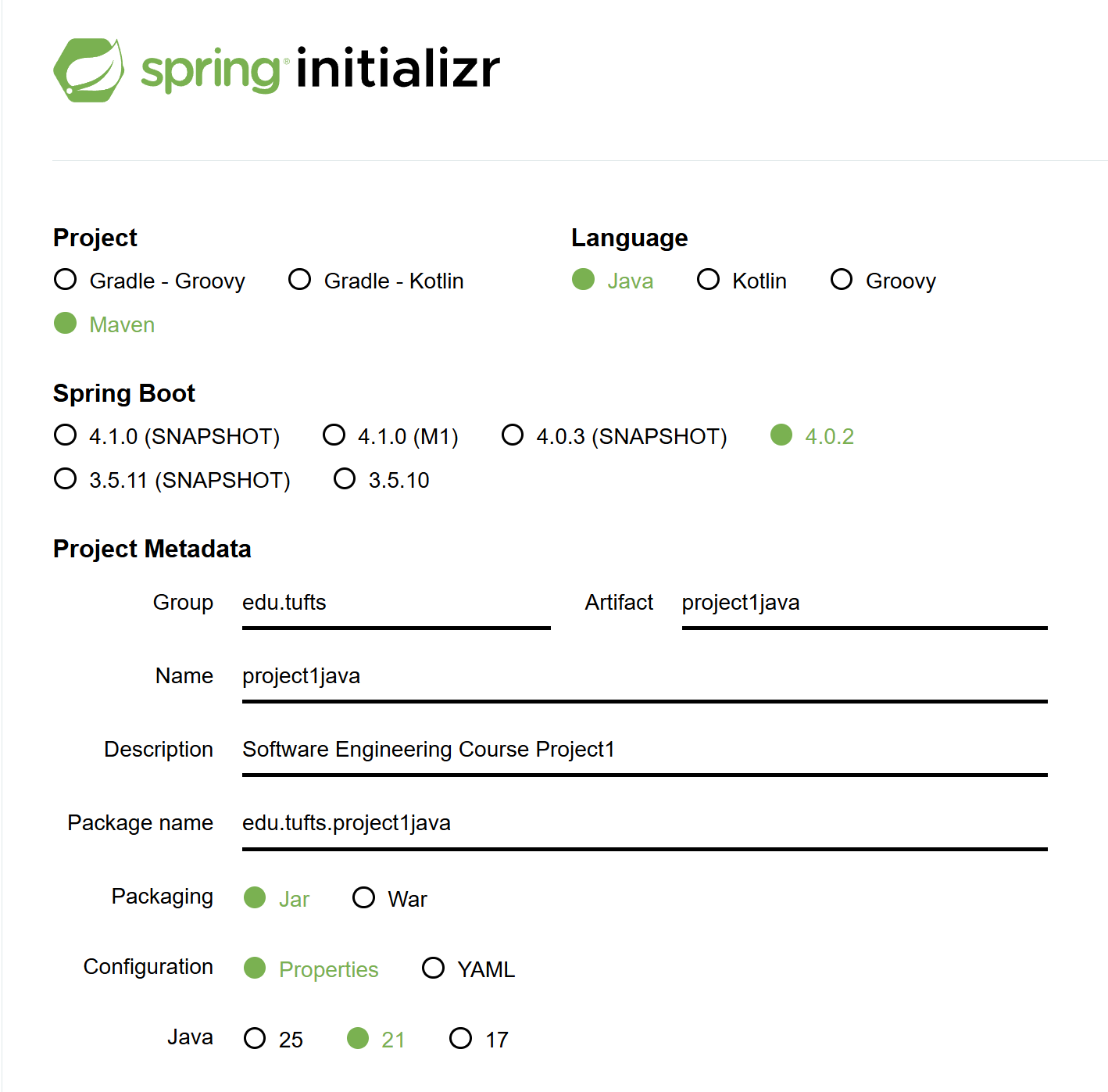
After downloading, you will have a folder called project1java. Then import the collaborator's skeleton into src -> main -> java -> edu -> tufts -> project1java.
At this point, the environment setup and skeleton integration are complete. The correct directory structure is shown below:
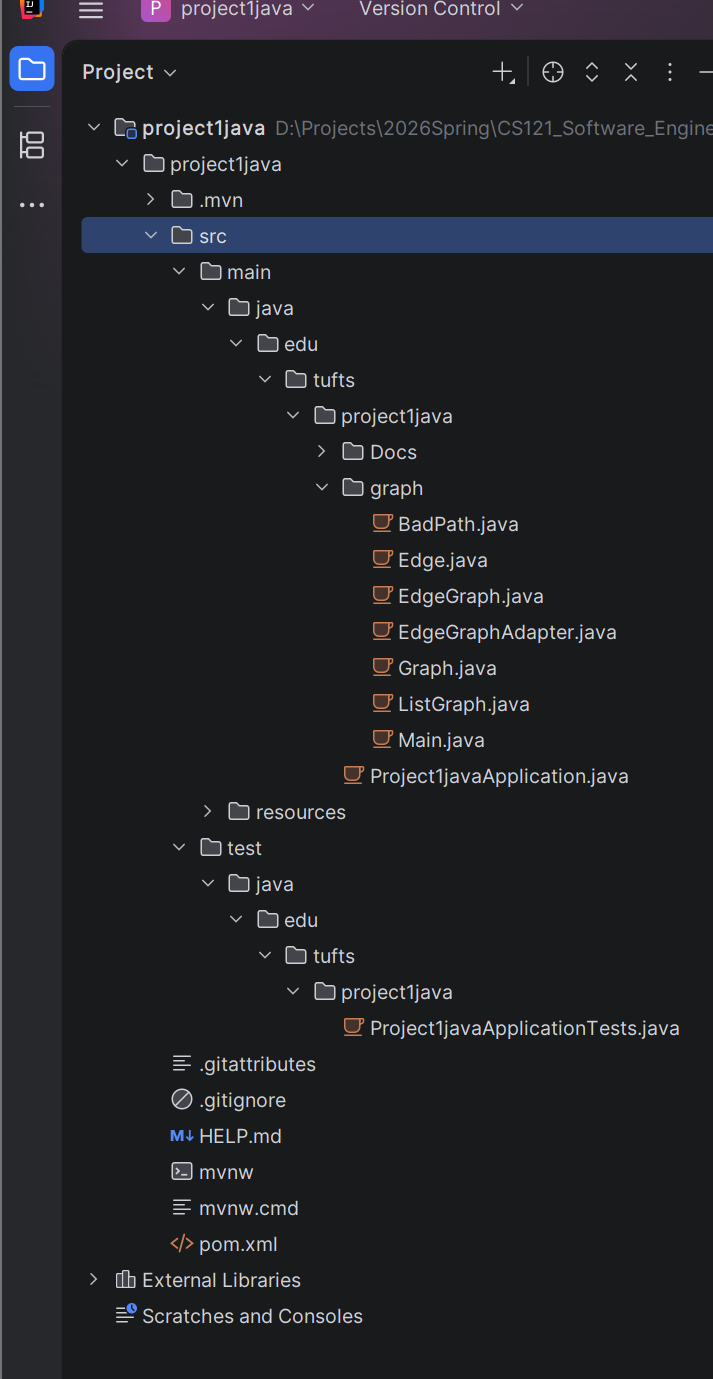
With the environment and code skeleton in place, you can proceed to the implementation phase. Before starting, it is advisable to verify the project settings:
- Press
Ctrl + Alt + Shift + S(orCommand + ;on Mac) to open the Project Structure window. - Click the Project tab on the left.
- Ensure the SDK field shows 21.
- Ensure the Language level field is also set to 21.
- Click OK.
After confirming the SDK and language version, you should also verify the Maven status. If the Maven icon is not visible on the right side of IntelliJ, the IDE may not have recognized the project as a Maven project. You can manually trigger recognition:
- Locate the
pom.xmlfile in the project tree on the left. - Right-click on
pom.xml. - At the bottom of the context menu, find and click "Add as Maven Project".
- Once complete, the Maven tab should appear on the right side of the interface.
After configuring Maven, you will likely see many error messages. The first step is to add the correct package declaration to every .java file under the graph folder: package edu.tufts.project1java.graph;
Implementing the Core Logic
There are two main tasks:
- Complete
ListGraph.java— implement the adjacency list logic usingHashMapandLinkedList. - Complete
EdgeGraphAdapter.java— adapt one graph interface (Graph) to another (EdgeGraph).
Then write two test files:
GraphTest.javaEdgeGraphTest.java
Note an important question here: why is the test file named GraphTest.java rather than ListGraphTest.java? This is a profound question that touches on a core principle of object-oriented design: programming to an interface (Coding to an Interface). In software engineering, test file names typically reflect the behavioral contract being verified, not merely the specific implementation class.
Since ListGraph is a concrete implementation of the Graph interface, what we should test is Graph — because we want to verify the graph's behavior, not the details of the adjacency list.
Let us open ListGraph.java and examine its contents:
import java.util.*;

public class ListGraph implements Graph {
    private HashMap<String, LinkedList<String>> nodes = new HashMap<>();

    public boolean addNode(String n) {
         throw new UnsupportedOperationException();
    }

    public boolean addEdge(String n1, String n2) {
         throw new UnsupportedOperationException();
    }

    public boolean hasNode(String n) {
         throw new UnsupportedOperationException();
    }

    public boolean hasEdge(String n1, String n2) {
         throw new UnsupportedOperationException();
    }

    public boolean removeNode(String n) {
         throw new UnsupportedOperationException();
    }

    public boolean removeEdge(String n1, String n2) {
         throw new UnsupportedOperationException();
    }

    public List<String> nodes() {
         throw new UnsupportedOperationException();
    }

    public List<String> succ(String n) {
         throw new UnsupportedOperationException();
    }

    public List<String> pred(String n) {
         throw new UnsupportedOperationException();
    }

    public Graph union(Graph g) {
         throw new UnsupportedOperationException();
    }

    public Graph subGraph(Set<String> nodes) {
         throw new UnsupportedOperationException();
    }

    public boolean connected(String n1, String n2) {
         throw new UnsupportedOperationException();
    }
}
You can see many instances of throw new UnsupportedOperationException(); — this line is known as a placeholder or stub in programming. It means "throw an 'unsupported operation' exception." It is used because, in the project skeleton, the method signatures have already been defined but the implementations have not yet been provided.
After implementing the basic functionality, we write a test for each feature and run the tests. We create corresponding test files under the test folder, for example:
    @Test
    @DisplayName("Add new node successfully")
    void testAddNodeSuccess(){
        Graph g = new ListGraph();
        boolean result = g.addNode("A");

        assertTrue(result);
        assertTrue(g.hasNode("A"));
    }
Note that different @Test methods do not affect each other — each runs on its own fresh object instance.
Once all code is complete, open the terminal and run mvn clean test. If the terminal lacks the necessary environment dependencies, you can use IntelliJ's Maven panel instead:
- Click the Maven tab on the far right edge of the IntelliJ window.
- Expand:
project1java->Lifecycle. - Double-click
cleanfirst (to remove previous build artifacts). - Then double-click
test(to execute unit tests).
If you see BUILD SUCCESS, it means your code compiled successfully and all unit tests (JUnit) passed.
Development Tools
Tools for reducing boilerplate code:
- Project Lombok:
- Uses annotations (such as
@Data) to auto-generate Getters, Setters, constructors,equals,hashCode, andtoStringat compile time. - Pros and cons: Improves development efficiency and code readability, but depends on IDE plugins, hides implementation details, is extremely difficult to debug with breakpoints, and may compromise encapsulation.
- Uses annotations (such as
- Java Records (introduced in Java 14+):
- A more concise native data carrier class compared to Lombok, though it shares similar debugging and encapsulation concerns. It is best evaluated on a project-by-project basis.
Version Control Fundamentals
Git Core Concepts
- Repository: The
.gitdirectory stores the entire history - Staging Area:
git addplaces changes into the staging area - Commit: An immutable snapshot, identified by a SHA-1 hash
Git Workflows
| Workflow | Characteristics | Use Cases |
|---|---|---|
| Git Flow | master + develop + feature/release/hotfix branches | Release-based projects |
| Trunk-based | Develop on main trunk with short-lived branches | CI/CD-intensive projects |
| GitHub Flow | main + feature branch + PR | Open source / continuous deployment |
CI/CD Fundamentals
Continuous Integration (CI)
Each commit automatically triggers: build → test → code analysis
Continuous Deployment (CD)
Automatically deploys to production after tests pass.
GitHub Actions Example
name: CI
on: [push, pull_request]
jobs:
  test:
    runs-on: ubuntu-latest
    steps:
      - uses: actions/checkout@v4
      - uses: actions/setup-python@v5
        with: { python-version: '3.11' }
      - run: pip install -r requirements.txt
      - run: pytest
RESTful API Design
Core Principles
- Use nouns for resources (
/users, not/getUsers) - HTTP methods express actions: GET/POST/PUT/DELETE
- Status codes express results: 200/201/400/404/500
Design Conventions
| Operation | Method | URL | Status Code |
|---|---|---|---|
| List | GET | /api/users |
200 |
| Get single | GET | /api/users/{id} |
200/404 |
| Create | POST | /api/users |
201 |
| Update | PUT | /api/users/{id} |
200 |
| Delete | DELETE | /api/users/{id} |
204 |
See Design Patterns, Version Control and CI/CD, and Full-Stack Development for more engineering practices.
Relations to Other Topics
- See Abstraction, Automation, and Limits of Software Engineering for the chapter-level line that connects abstraction, specification, and automation
- See System Design for how requirements become service boundaries, capacity models, and high-level architecture
- See Version Control and CI/CD and Testing and Quality Assurance for how changes are validated and shipped safely
- See Full-Stack Development and Design Patterns for how local code structure interacts with whole-system concerns
References
- Ian Sommerville, Software Engineering, 10th edition, Pearson, 2015.
- Frederick P. Brooks, Jr., "No Silver Bullet: Essence and Accidents of Software Engineering", Computer, 1987.
- David L. Parnas, "On the Criteria To Be Used in Decomposing Systems into Modules", Communications of the ACM, 1972.
- Eric Evans, Domain-Driven Design, Addison-Wesley, 2003.
- The Twelve-Factor App, Heroku.